1. Cost – at $499, it is much more affordable for districts to put these in classrooms. Throw in a projector and it’s at least a 1/3 of the price of a Promethean or SMART board. Calculate Donors Choose or other funding sources, and you could have one in your room before you know it!
2. Installation – there is no bulky board to set up. All you need is a flat, smooth surface – like the dry erase type white board that many classrooms already have.
3. Portability – In theory teachers could share these devices. Place one on a cart with an LCD projector, a laptop (if the teacher doesn’t already have one), and you’re good to go.
Here is a little video if you’re starting to get intrigued by this device:
Pretty neat, huh?
When Learning Resources contacted me and asked me to review this little gadget, I was super excited. There are many teachers in our district that still do not have IWBs and are just dying to get their hands on one!
The Now!Board works just like an IWB, but without the big screen. You still need a projector, and you still need a computer. If you can manage to get your hands on those, you’re good to go.
When I got the device in the mail, I was surprised by the small packaging. It was neatly packed in a blue box with the device, the stylus and a neat little carrying pouch.

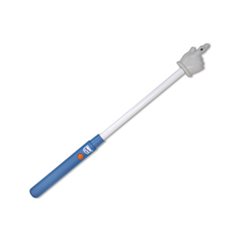 The kids are already familiar with these kids of pointers, so they will be excited to see it! It is super kid friendly, and I love that it is longer than a standard stylus. It allows those little arms to really reach the object that they want to move around!
The set-up process with simple, just insert the disc and follow the on-screen instructions. Super easy. I used it on a Mac and there were no issues along the way.
I had a few struggles with the calibration of the device though. My LCD projector is mounted on the ceiling, and although the instructions say that you can still use the device with a ceiling mounted projector, I struggled a bit. My cables were simply not long enough to have the computer and Now!Board far enough behind the projector.
 After some frustration, I decided to try it in a different classroom with an LCD projector that is on a cart. After some trial and error, I did have success. The device works just like an IWB. In fact, I could even open up my Promethean Software and use the flipcharts that I have already created.
I think this device is a great alternative to schools/teachers that really want to have the features of an IWB, but simply can’t afford the expense. This little gadget is portable, so it could be checked out and shared among grade levels. Just keep in mind that each time it is moved it does need to be recalibrated.
I really appreciate Learning Resources giving me the opportunity to check out this new technology! I do think that this is the future of interactive technology!
And now…here’s a little fun for you all! Learning Resources has graciously offered a $100 (yes, you read that right) Learning Resources gift certificate! You could put that towards a Now!Board of your own, or towards something else that you may have had your eye on!
Here is what you need to do for a chance to win:
1. Go to Facebook and “like” Now!Board
2. Go to YouTube and “like” their YouTube page.
3. Follow MY blog :)
4. Follow my TpT store
I’m going to try out a new way to keep track of all of your entries! It’s called Raffle Copter! Let’s hope this works! Just use the widget below to log in and make your entries! This is new to me too, so bear with me if there are any hiccups!
Good luck!
a Rafflecopter giveaway