

(Thanks Amy Lemons for the great graphic!)
First, I’ll share with your some of the ways that I use technology in my classroom. I’m pretty lucky to work in a district that really emphasizes the use of technology with kids!
Here is what I use on a daily basis:
Promethean IWB


These fun games are super easy to pop into your computer and use as a time – filler, a whole lesson, or as a math or literacy center. My kids have enjoyed using both, and I can’t wait to get my hands on more. There are many Lakeshore games available for the ipad too! I love all Lakeshore products and these certainly don’t disappoint! The colors and graphics are fun and engaging for kids. It’s super easy for kids to work on independently – they are such naturals with technology!
Psst…keep reading for a chance to win some of these awesome software titles!
Ipads:
 I was lucky enough to receive a grant to have 5 ipads in my classroom! Yeah! So far, we have been using them during centers and for whole group lessons.
Some that we have used are:

Magnetic letters. The free version only has uppercase. We’ve use this for word building and other word work in small and large group. (I hook my ipad up to my IWB.)

Letter School. I LOVE this app, and the kids do too. I purchased the full version for my daughter and she loves it too! It teach the correct path of motion in a super fun way!

This app is called Monster Squeeze. It goes with our Every Day Math Curriculum. The children love it! It’s not a free app, but EDM often has if for free during the NCTM conference in the fall.

This is a free app you can use to practice sight words. There is also one with a blue background. You can’t choose the words, but the children still enjoy it.
These are just a few off the top of my head, but I will blog more about the apps we are using at another time!
iTunes and iPod:
If you’re like me, you have TONS of CDs, and
I’ll also create a page on my calendar flipchart for each month with my morning opening songs. I call this my monthly “jukebox.” I add a cute clipart and link the song to the clipart. I just click on the song and it’s ready to go!
I will do this with YouTube videos as well – except I take a screen shot of the video, and then I link to it from the flipchart. I wish I could show you a picture of these two flipchart pages, but I don’t have my school computer with me!
Fitness and Technology:
Yes, sometimes it IS too cold to go outside in ND. Usually when the windchill is below 0 we will stay inside. One of the activities that my kiddos LOVE doing is Adventure to Fitness.

Listening Center:

This is another center that I have weekly. Generally the children share the book, but this time I had multiple copies. After they have finished listening, they will respond to a prompt that I have provided for them in their yellow books that you see in the picture.
MP3 Players:
One of my goals for the remainder of the year is to incorporate these little guys:
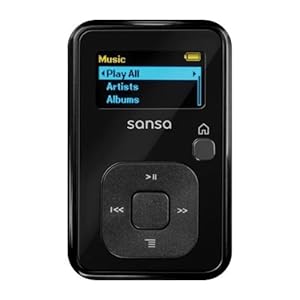
I have 4 of these that I received from a grant. I hope to be able to upload a variety of books that the children can listen to after they finish their literacy centers.
I also have these:


and I have a math one, but can’t seem to find it on Lakeshore’s site. I want to use my mp3 players with these for independent work too.
Phew, I could go ON and ON about technology. What are your favorites for technology? What are your resolutions? Post with a comment below!
After you’ve posted a comment, how about a chance to win some amazing prizes?! You have a chance to enter TWO giveaways! You could win a fabulous prize pack from my bloggy BFFs and/OR a prize pack of THREE interactive games from Lakeshore learning for your IWB!
Here is giveaway number 1. Check out the catalog below – one lucky winner will win each of these products. Use the Rafflecopter below to enter. But be QUICK – this giveaway will end in 24 hours! *You actually get a little more time on this one -- I'm overseas now and I can get the Rafflecopter to show the correct amount of time because of the time change!*


a Rafflecopter giveaway What are your technology resolutions? What are you doing that works well? Link up below and share! Maybe you don’t know how to enter a linky – make that resolution #1! Maybe you don’t know how to enter a giveaway? Make that resolution #2!
Be sure to check out 2nd Grade Shenanigans for tomorrows link-up!


 Every year at Christmas and on Nora’s birthday, we make a donation to


